Autocomplete multi-source search with ArcGIS REST services
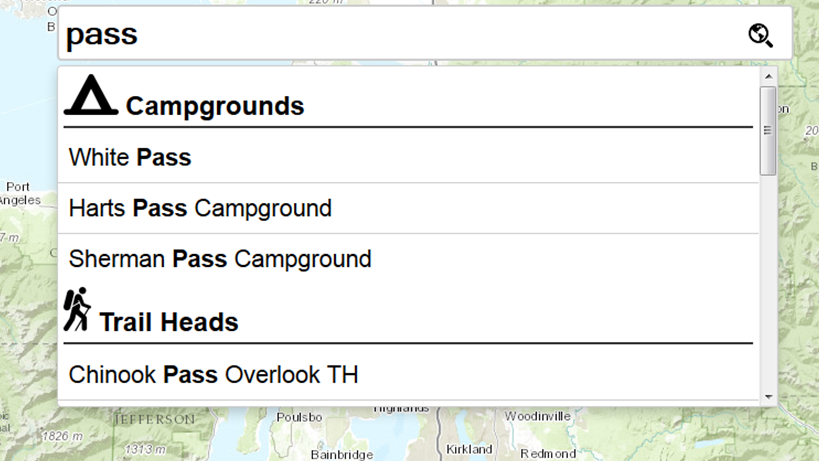
Search First. Search is expected in modern web applications. And what better use of a map application than to start typing what you want, get a list of relevant suggestions, pick one, and be taken there with some useful context info.
In several posts on the geospatial blog MapBrief, Brian Timoney has discussed a “Search First” approach to web app building. Most recently:
Good Thing #1: A Big, Obvious Auto-Complete Text Entry Box
I couldn’t agree more. It’s core to nearly every application I build and is far more useful than novelty “standard” web-mapping tools (looking at you, measure tool).
Search is the number one request I get in web-mapping applications, so I thought I’d share how I put the pieces together to get an autocomplete search running with Esri ArcGIS REST services.
I’ll walk through the steps to build a fully functioning autocomplete map search feature.
Wire up Typeahead with jQuery, add engines, and define the UI
Handle the event when a user selects a suggestion
Define the Engines
In this example we use four engines (Bloodhound instances), one for each source:
Sources (formerly a table with icons):
Campgrounds — ArcGIS Feature Service
Trailheads — ArcGIS Feature Service
Ski Areas — ArcGIS Feature Service
Esri World Geocoder service
Constructing the Remote Sources
This is the most critical part: each engine needs a URL that sends a request every time the user types characters. The choice of endpoint determines performance.
Option 1: find
Great if you have a MapServer and want to search across multiple layers in one request.
Option 2: query
For FeatureServer setups — you can query each layer individually or the entire feature server.
Option 3: suggest
Best for geocoding. ArcGIS supports suggest for locator services. We’ll use the Esri World Geocoder with suggest.